
This guide covers essential best practices for daily operation of the BrightDrop Zevo, a purpose-built electric delivery van developed by General Motors (GM) for last-mile delivery and available in two models, the BrightDrop Zevo 400 and the BrightDrop Zevo 600. Whether you are a delivery driver or a fleet manager operating BrightDrop electric vans in Canada or across North America, the sections below cover powering the vehicle on and off, maximizing battery range, and using Delivery Mode. Full model specifications are at the end of this guide.
POWER ON THE VEHICLE
-
The Remote Keyless Entry transmitter (key fob) must be in the cabin to start the vehicle.
- With the vehicle in Park or Neutral, press the brake pedal and then press the POWER button.
- When the vehicle is ready to be driven, an active battery gauge will display on the instrument cluster and the Ready icon will appear.
 NOTES
NOTES
· If the key fob battery is weak, place the key fob in the upper instrument-panel storage compartment, behind the infotainment display, to enable the vehicle to start. Replace the key fob battery as soon as possible.
· It’s recommended to remote start the vehicle when it is plugged in to allow energy from the wall outlet to assist in conditioning the cabin to a comfortable temperature and to leave more battery energy for driving.
POWER OFF THE VEHICLE
- Shift to Park and then press the POWER button.
ACCESSORY MODE
With vehicle power off and the brake pedal not depressed, press the POWER button to place the vehicle in Accessory Mode. This power mode allows use of some electrical accessories. After 30 seconds, vehicle power will turn off to prevent 12V battery rundown.
Refer to the BrightDrop Zevo Quick Guide by clicking here
Refer to the whole BrightDrop Zevo Owner's Manual by clicking here
Refer to BrightDrop Zevo 600 Vehicle Operator Training Guide by clicking here
MAXIMIZING RANGE
- Accelerate smoothly to help increase range. Rapid acceleration can drain battery energy more quickly.
- Use regenerative braking, which can help charge the battery, instead of making rapid stops. It gives it better range in City Style stop and go driving because they utilize the momentum of the van slowing down and the friction that creates during the braking process to actually recharge the batteries so the more you break the longer you can drive.
- One-Pedal Driving Mode. With One-Pedal Driving, the vehicle can be slowed or stopped under certain conditions using only the accelerator pedal, which can help maximize driving range while reducing the need to switch between the accelerator and brake pedals in heavy traffic. When the accelerator pedal is not applied, regenerative braking will be active to help slow the vehicle. One- Pedal Driving does not operate in Reverse. Use the brake pedal for additional braking or emergency braking (Feature may be limited when the battery temperatures are extremely cold or hot, or when the battery is near full charge).
- Drive at posted speed limits. Higher speeds use more energy and significantly reduce range.
- Climate Settings. Keep exterior doors closed to maintain cabin temperature. Use open windows or fan-only settings to cool the cabin.
- Avoid continuous use of the climate control system (heated seat feature is optional, but use it instead of the cabin heating system when possible. The energy needed to warm or cool the cabin can cause range to decline significantly).
The BrightDrop Zevo 600 with the Max battery delivers up to 272 miles of combined driving range. Range performance will vary based on cargo weight, traffic conditions, climate settings, AWD configuration, and driving habits. For real-time energy data, navigate to Vehicle Status and then Energy Info on the BrightDrop Zevo infotainment screen. Driving efficiently across delivery routes can significantly extend how many miles the BrightDrop Zevo delivers per charge.
POWER INDICATOR
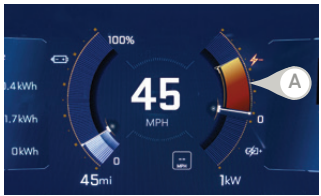
The Power Indicator Gauge (A) displays instantaneous charge and consumption power to help track energy use and extend battery range.
-
A green Power Indicator Gauge indicates energy regeneration through braking.
-
Avoid driving that turns the Power Indicator Gauge amber, indicating excessive power use.
- Energy: To view current Energy Efficiency and Energy Usage data, go to Vehicle Status>Energy Info on the infotainment screen.
DELIVERY MODE
Delivery Mode is intended to speed the delivery process by automating repetitive tasks for the driver.
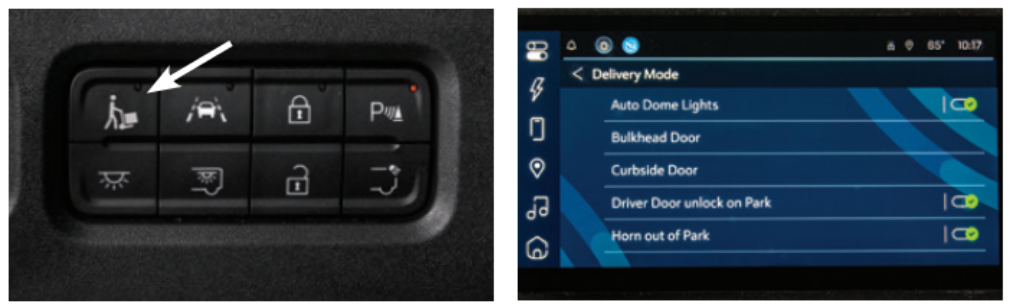
- Press the Delivery Mode button to have the cabin lights turn on automatically and for the bulkhead door to unlock for 15 seconds when the vehicle is shifted into Park.
- With the Auto-Open Bulkhead Door (optional equipment) the bulkhead door will auto open when the vehicle is shifted into Park.
- With the Power Door Package (optional equipment) the power bulkhead door and power curbside door automatically open after the vehicle is shifted into Park and automatically close after a set period of time. The power curbside door reopens upon the driver (with key fob) approaching the vehicle and closes when the vehicle is shifted out of Park.
- Once the vehicle is shifted out of Park, the cabin lights turn off and the horn sounds to alert those nearby that the vehicle is about to depart.
Note: If the vehicle is not shifted out of Park after a set period of time, the cabin lights will automatically turn off to preserve battery life.
To enable a charging session, check this article:
Disclaimer
This article is based on information sourced from the official user manual provided by the product’s manufacturer. We do not claim ownership of the content, technical specifications, or procedures referenced. It is intended solely for informational purposes and should not replace the manufacturer’s official documentation.
For complete product details, operating instructions, and service guidelines, please refer to the manufacturer’s manual.
Please note: 7Gen is not an authorized service center. If you are a 7Gen client, please reach out to us through our support line below. Otherwise, contact the manufacturer or your equipment supplier directly for any support or service needs.
If you're exploring fleet electrification solutions or would like to learn more about partnering with 7Gen, please contact us at contact@7gen.com.
DO YOU HAVE AN ISSUE THAT REQUIRES FURTHER ASSISTANCE?
Please, do not hesitate to contact us through:
- 7Gen Customer Support Portal. By clicking here you can find instructions on how to create an account within our support center.
- Email: support@7gen.com
- Emergency line / 24/7 Call Centre: +1 855 743 6938
BRIGHTDROP ZEVO MODELS AND SPECIFICATIONS
The Chevrolet BrightDrop Zevo was produced in two configurations to meet different cargo and route requirements. Both are built on GM's Ultium battery platform and produce zero tailpipe emissions.
BrightDrop Zevo 400
Approximately 400 cubic feet of cargo area, front-wheel drive (FWD), GVWR of 9,990 lbs. The Zevo 400 is sized to fit standard parking spots, making it well suited for urban delivery environments where maneuverability matters.
BrightDrop Zevo 600
Up to 614.7 cubic feet of maximum cargo volume, offered with an all-wheel drive (AWD) configuration, GVWR of 9,990 or 11,000 lbs, and a maximum payload of approximately 3,230 lbs. The Zevo 600 is designed for higher-volume delivery routes where cargo volume is the priority. The AWD configuration uses two GM Ultium Drive motors for improved performance and traction.
The BrightDrop Zevo 600 with the Max battery delivers up to 272 miles of combined driving range. The BrightDrop Zevo supports DC fast charging at up to 120 kW and AC charging at up to 11.5 kW, so most fleets can rely on overnight depot charging and keep fast charging for longer routes. For complete BrightDrop Zevo specifications including full range ratings, payload, and dimensions, refer to the BrightDrop Zevo Owner's Manual or the BrightDrop Zevo 600 Vehicle Operator Training Guide.
SAFETY FEATURES THAT PROTECT DRIVERS AND PEDESTRIANS
The Zevo includes more than 20 standard safety features designed with delivery drivers and urban pedestrians in mind. Automatic Emergency Braking and Front Pedestrian Braking help the van react when something enters its path, Forward Collision Alert warns the driver of hazards ahead, and Lane Keeping Assist helps maintain lane position at highway speeds. An HD backup camera improves visibility when operating in Reverse, and Park Assist makes tight loading zones easier to manage. These systems support the driver but never replace attentive driving, so treat them as a backup to the best practices described above rather than a substitute for them.
BRIGHTDROP AND GENERAL MOTORS: BACKGROUND
BrightDrop began as a standalone GM technology startup and joined the Chevrolet brand as of the 2025 model year, which is why the vans are now referred to as the Chevrolet BrightDrop Zevo. The Zevo was a significant development for GM in the commercial EV sector, competing with other electric delivery vans for the last-mile segment, which is often the most expensive and emission-intensive part of the delivery chain. The Zevo was assembled at GM's CAMI Assembly plant in Ingersoll, Ontario, making it a Canadian-built vehicle, and the program moved from concept to production in less than two years, the fastest vehicle development and plant conversion in GM's history. Major fleets including FedEx, Walmart, and DHL Express Canada were among its first operators, reflecting the vehicle's focus on the parcel and service delivery segment. GM concluded BrightDrop production in late 2025, and Zevo vans already in service continue to operate across North America. 7Gen continues to support its clients running Zevo fleets.
WHY FLEETS CHOOSE ELECTRIC DELIVERY VANS
Electric delivery vans can lower total cost of ownership compared to conventional vans. Electric drivetrains have fewer moving parts, which reduces maintenance needs, and electricity typically costs less per kilometre than fuel. Zero tailpipe emissions also help companies meet sustainability goals and improve air quality on urban routes. The Zevo adds built-in connectivity that supports fleet management, giving operators access to vehicle and battery data that make charging and route planning easier to coordinate. Combined with features like Delivery Mode, which automates repetitive tasks between stops, the result is a vehicle designed around driver productivity and fleet efficiency. If you are planning charging infrastructure or driver training for your fleet, the 7Gen team can help through the contact options below.
CHARGING INFRASTRUCTURE AND SOFTWARE FOR ELECTRIC FLEETS
Reliable charging infrastructure is essential for operating electric delivery vans at fleet scale. Charging stations come in three types: Level 1 uses a standard household outlet and suits occasional or emergency charging, Level 2 provides the overnight depot charging most delivery fleets rely on, and DC fast chargers deliver a rapid charge for vehicles on longer routes. Matching the right mix of charger types to routes and dwell times is one of the most important decisions in any fleet electrification plan.
Charging management software completes the picture. EV charging software provides real-time data and actionable insights that help fleet managers schedule charging, monitor energy use, and confirm every vehicle is ready for its route. Used well, it lowers operational expenses while supporting driver productivity and safety, all of which contributes to a lower total cost of ownership for the fleet. The deployment of charging infrastructure is also supported by government incentives and programs in many regions, aimed at promoting electric vehicle adoption and reducing emissions.
EMISSIONS, INCENTIVES, AND FINANCING THE TRANSITION
Zero emissions fleets contribute significantly to reducing greenhouse gas emissions and improving air quality in urban areas, which benefits public health as well as corporate sustainability reporting. Full electrification of delivery vans allows companies to work toward carbon-neutral goals and operate with zero tailpipe emissions, and fleet electrification offers a scalable path for corporations to meet sustainability targets through decarbonization.
There can be a financial side to those reductions. Carbon credits are a market-based mechanism that allows companies to buy and sell emission allowances, with one credit typically representing one tonne of carbon dioxide equivalent. In some regions, including jurisdictions with low-carbon fuel programs, businesses operating electric vehicles can generate credits that are sold to companies needing to offset their emissions, creating a direct financial incentive for electrification. Many governments have also offered purchase incentives such as rebates, grants, or tax credits for electric vehicles, though program availability changes over time, so confirm what is currently offered in your region before planning a purchase.
Finally, ownership is not the only route. Leasing options for electric vehicles often include flexible terms that help businesses manage cash flow during the transition, and they provide access to the latest technology without the long-term commitment of ownership, making it easier to upgrade as new models are released. Most leasing agreements include mileage limits with charges for exceeding them, so review the terms against your actual route distances.
Last reviewed: June 2026.