
If your BrightDrop Zevo is not charging, this guide walks you through the fixes a driver or fleet operator can safely try on site. It starts with a step-by-step charge cord reset at the rear wheel well grommet, then covers how to read the charge port indicator lights, what to check when the fault is on the charging station or in the vehicle software, how normal charging should look across Level 1, 2, and DC fast charging, and the installation basics behind a reliable charging setup.
- Stand near the left side rear wheel of the Zevo electric vehicle.
- Look for the grommet, which is located inside the rear wheel well on the left side of the vehicle.

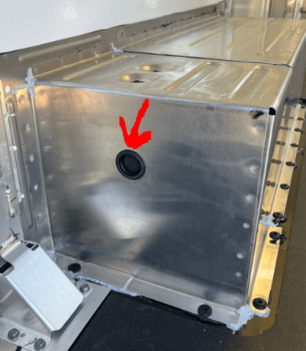
- Carefully use a screwdriver or a non-sharp knife to remove the grommet cover. Be gentle to avoid damaging the grommet or surrounding parts.
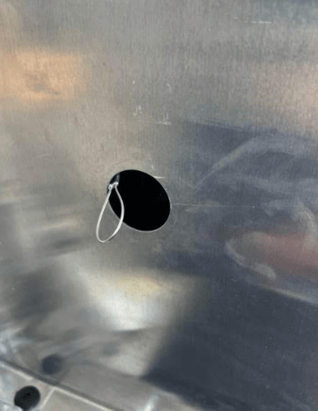
- Once the grommet cover is removed, you should see a braided line with a loop attached to it.
- Gently and lightly pull on the cord with the loop for about an inch only. Be extremely cautious not to pull it out completely, as this may require a visit to the Service Centre for repair.
- After pulling out the cord slightly, gently feed it back into the black sleeve or casing that it is housed in within the wheel well.
- Follow the manufacturer's instructions for charging your Zevo electric vehicle.
- Monitor the charging process to ensure it starts without issues.
Safety Precautions:
- Be gentle and cautious when handling the grommet and charging cable.
- Never use a sharp tool to remove the grommet cover to prevent damage.
- If the cord comes out completely, do not attempt self-repair; seek professional assistance.
Related Article:
Disclaimer
This article is based on information sourced from the official user manual/website provided by the product’s manufacturer. We do not claim ownership of the content, technical specifications, or procedures referenced. It is intended solely for informational purposes and should not replace the manufacturer’s official documentation.
For complete product details, operating instructions, and service guidelines, please refer to the manufacturer’s manual.
Please note: 7Gen is not an authorized service center. If you are a 7Gen client, please reach out to us through our support line below. Otherwise, contact the manufacturer or your equipment supplier directly for any support or service needs.
If you're exploring fleet electrification solutions or would like to learn more about partnering with 7Gen, please contact us at contact@7gen.com.
DO YOU HAVE AN ISSUE THAT REQUIRES FURTHER ASSISTANCE?
Please, do not hesitate to contact us through:
- 7Gen Customer Support Portal. By clicking here you can find instructions on how to create an account within our support center.
- Email: support@7gen.com
- Emergency line / 24/7 Call Centre: +1 855 743 6938
MORE WAYS TO TROUBLESHOOT A ZEVO THAT WON'T CHARGE
If the grommet and charge cord check above does not resolve the issue, work through these common causes before contacting support. Most failed charging sessions come down to a connection or a fault signalled on the charge port.
Check the connection. Make sure the charge cord is fully inserted and locked into the vehicle's charge port. The charge port indicator illuminates blue when connected and flashes green once charging begins. A securely seated connector is required before charging can start, so reseat the cord if nothing happens on plug-in.
Read the charge port light. A flashing red charge port indicator signals a fault. When you see it, check the charge cord connection at both the vehicle and the charger, and confirm the power supply or electrical outlet is live. Periodically check the electrical outlet during charging, and if it is hot to the touch, stop and have it serviced by a qualified electrician.
Reset the equipment. For a Level 2 charge cord, unplugging the charger for at least 30 seconds can reset it. Reconnect and watch for the indicator to return to normal. Never use an extension cord with an EV charger, as this can cause overheating and is a recognized cause of failed or unsafe charging.
Watch for a stuck connector. In some cases the connector locks in place. To release it, follow the vehicle's unlock procedure, which may require unlocking all doors or using the unlock charge connector button on the key fob.
WHEN THE PROBLEM IS THE STATION OR THE SOFTWARE
Not every charging problem is the vehicle. A fault light on a home or public EVSE points to the charging station rather than the Zevo, so try a different charger to isolate the cause. If the vehicle charges at the depot but not at a public station, the issue is likely on the station side.
Some charging issues are resolved through software. Certain BrightDrop Zevo 600 units have experienced charging initiation problems at busy public DC fast charging stations, which GM has addressed through updated vehicle software. If your charge attempts fail mainly at high-traffic public stations, a software update may be the fix, and your service contact can confirm whether one applies to your vehicle.
Some faults store diagnostic trouble codes that a certified technician needs to read and clear with the proper tools. If the steps above do not restore charging, or if the same fault keeps returning, open a ticket through the 7Gen Customer Support Portal with your vehicle details and a photo of the charge port indicator so the team can route it quickly.
UNDERSTANDING BRIGHTDROP CHARGING LEVELS
Knowing what normal charging looks like makes it easier to spot a real problem. The BrightDrop Zevo supports three charging levels, each with a different speed and use case. Level 1, using a standard 120V household outlet, adds roughly 3 to 4 miles of range per hour and is suited only to occasional top-ups. Level 2, the overnight depot standard on a 240V commercial circuit, reaches a full charge in approximately 9.5 hours with the Zevo's onboard charger. DC fast charging supports up to 120 kW and can take the battery from about 10% to 80% in roughly 45 minutes, useful for longer routes and quick turnarounds.
For day-to-day operation, charging to about 80% is enough for most routes, promotes long-term battery health, and frees the charger sooner, since charging slows after 80%. Charging to 100% is best saved for longer trips when maximum range is needed. Relying on overnight Level 2 charging and reserving DC fast charging for when it is actually needed also helps limit the heat that frequent fast charging puts on the battery over time.
CHARGING INFRASTRUCTURE AND INSTALLATION NOTES
Reliable charging starts with proper installation. Commercial Level 2 installations for BrightDrop vans typically require 40A to 80A dedicated circuits, and the work must meet Canadian electrical code standards, including dedicated circuits, correct breaker sizing, and permit approval. In Canada, a straightforward Level 2 installation generally runs $800 to $2,000 per charger where sufficient panel capacity exists, rising to $2,000 to $6,000 or more when electrical upgrades, load management systems, or multiple-unit installations are involved. Factors such as the distance from electrical panels to parking areas and any underground conduits or trenching requirements can affect the scope, so a qualified electrician should assess the site first.
Funding can offset much of this cost. Natural Resources Canada's Zero Emission Vehicle Infrastructure Program (ZEVIP) provides funding to support EV charging infrastructure for businesses, and many provinces offer additional rebates for commercial charger installations. Program availability and timing change, so check the incentives currently open in your region before planning an installation, and your 7Gen account contact can point you to the right programs.
Last reviewed: June 2026.